Thursday, March 1, 2018

Disabling Check Point WebUI first time configuration wizard

Disabling Check Point WebUI first time configuration wizard

You need to disable the wizard in expert mode, you must set the expert password before you can login to expert mode
CPFW1> set expert-password plain
Enter a secure password twice
CPFW1> expert
[Expert@CPFW1]# touch /etc/.wizard_accepted
 
 [Expert@CPFW1]# exit
CPFW1> cpconfig
 Select “y” to accept licensing terms
Choose (1) for Stand Alone installation or (2) for Distributed
Select “y” or “n” to add licenses
Select “y” to add an administrator account. Enter a username and password
Define a GUI client “y”
Save certificate fingerprint if required
Reboot once complete

Checkpoint Gaia - Link Aggregation

Check Point Gaia – Link Aggregation

Below is instructions on how to setup either HA or Load Sharing, using Check Point R77.10 Gaia. Please test in a lab environment before implementation in production.

Setting up a High Availbility (Active/Backup) interface bond

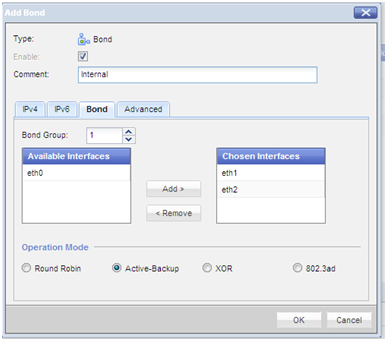
Create a bond group 1 and add interfaces eth1 and eth2. Define the mode, in this instance the bond with act in Active/Backup configuration.
add bonding group 1
set interface bond1 state on
add bonding group 1 interface eth1
add bonding group 1 interface eth2
set bonding group 1 mode active-backup


Specify eth1 as the Active interface
set bonding group 1 primary eth1

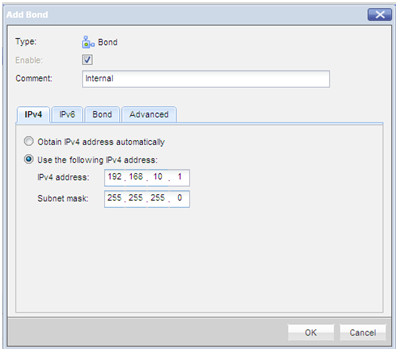
Enable the bond (if not already enabled) and physical interfaces and assign an IP address. Optionally set a comment to help identifying the bond
set interface bond1 ipv4-address 192.168.10.1 mask-length 24
set interface bond1 comments “Internal”

Enable the physical interfaces (if not already enabled)
set interface eth1 state on
set interface eth2 state on
The HA bond is now configured and should work, perform some tests by unplugging an interface and verifying there is still connectivity.
An HA bonded interface does NOT require any special configuration on the switch the physical interface is plugged into. The switchport interfaces should however we configured identically, with the same VLAN ID and it would be advisable to enable “portfast”.

Setting up a Load Sharing (Active/Active) interface bond

Create a bond group 1 and add interfaces eth1 and eth2. Define the mode, in this instance the bond with act in Active/Active configuration.
add bonding group 1
set interface bond1 state on
add bonding group 1 interface eth1
add bonding group 1 interface eth2
set bonding group 1 mode 8023AD

On a Cisco switch an etherchannel will need to be created. Create the etherchannel using LACP
port-channel load-balance src-dst-ip
interface range fastethernet 0/1-2
channel-group 1 mode active
channel-protocol lacp
exit
interface port-channel 1
description “FIREWALL PORT CHANNEL”
switchport mode access
switchport access vlan 10
spanning-tree portfast
exit
The Load Sharing (Active/Active) bond is now configured and should work, perform some tests by unplugging an interface and verifying there is still connectivity. In my tests when unplugging an interface in a Load Sharing configuration there was no noticeable missed pings, compared to an HA configuration when I observed 1 missed ping.

Troubleshooting commands

From expert mode execute the following command – “cat /proc/net/bonding/bond1”
NOTE – “bond1” is the name of the bond previously create, change to name of your bond

R80.10 - interface_rebuild_splat.sh

#!/bin/bash
# Last Edit on 02/27/2013
# This does not currently function on:
# Firewalls with bridged interfaces (LACP)
# Firewalls with interface numbers above eth9 
# Not suggested for usage on VSX.

echo "Hello, please enter the correct log file to analyze"
ls | grep interfaces
read logfile

echo "Thank you - Recreating interfaces now"

# Creating non-VLAN interfaces 
cat $logfile | grep -v "eth.\." | sed 's/\:/ /g' | awk '{print "ifconfig",$1" up"}' | sort -u | sh 
cat $logfile | grep -v "eth.\." | awk '{print "ifconfig",$1,$2" netmask",$3 }' | sh > /dev/null 2>&1
cat $logfile | grep -v "eth.\." | awk '{print "ifconfig",$1" up"}' | sh

# Creating VLAN'd interfaces
cat $logfile | grep "eth.\." | sed 's/\./ /g' | awk '{print "ifconfig",$1" up"}' | sh 
cat $logfile | grep "eth.\." | sed 's/\./ /g' | awk '{print "vconfig add",$1,$2}' | sh 
cat $logfile | grep "eth.\." | awk '{print "ifconfig",$1,$2" netmask",$3 }' | sh > /dev/null 2>&1
cat $logfile | grep "eth.\." | awk '{print "ifconfig",$1" up"}' | sh

echo "Finished recreating the interfaces..."
echo " "
echo "Please remember to run ifconfig --save when finished!"
echo "Goodbye "

R80.10 Checkpoint Top Talkers Script - Display top 50 Source/Destinations

#!/bin/bash
# Last Edit on 05/03/2013
# Using SecureXL connection table vs general connections table to minimize impact on live devices. It is also significantly quicker to poll.

pause(){
  local m="$@"
 echo "$m"
 read -p "Press [Enter] key to continue..." key
}


clear
while :
do
clear
echo "Hello, Welcome to the Checkpoint Top Talkers display utility by Craig Dods"
echo "-----------------------------------------------"
echo "      M A I N - M E N U"
echo "-----------------------------------------------"
echo "Please note that this is for use on devices with SecureXL enabled ONLY"
echo ""
echo "1.  Display the top 50 Source/Destination combos"
echo "2.  Display the top 50 Source/Destination combos with identical Destination Ports"
echo "3.  Display the top 50 Source/Destination combos with identical Source Ports"
echo "4.  Display the top 50 Sources"
echo "5.  Display the top 50 Destinations"
echo "6.  Display the top 50 Source/Destination combos on a Custom Destination Port"
echo "7.  Display the top 50 Source/Destination combos on a Custom Source Port"
echo "8.  Display the top 50 Sources on a Custom Destination Port"
echo "9.  Display the top 50 Destinations on a Custom Destination Port"
echo "10. Display the top 50 Sources on a Custom Source Port"
echo "11. Display the top 50 Destinations on a Custom Source Port"
echo "12. Display the top 20 Destination Ports"
echo "13. Display the top 20 Source Ports"
echo "14. Display Connections From A Specific Host (large list)"
echo "15. Display Connections To A Specific Host (large list)"
echo "16. Exit"

echo -n "Please Make A Selection:  "

read opt
 case $opt in
 1) 
 echo "     #      SRC IP          DST IP"
 fwaccel conns | awk '{printf "%-16s %-15s\n", $1,$3}' | sort | uniq -c | sort -n -r | head -n 50;
 pause;;
 2) 
 echo "     #      SRC IP          DST IP       DPort"
 fwaccel conns | awk '{printf "%-16s %-16s %-10s\n", $1,$3,$4}' | sort | uniq -c | sort -n -r | head -n 50
 pause;;
 3) 
 echo "     #      SRC IP          DST IP       SPort"
 fwaccel conns | awk '{printf "%-16s %-16s %10s\n", $1,$3,$2}' | sort | uniq -c | sort -n -r | head -n 50
 pause;;
 4) 
 echo "     #      SRC IP"
 fwaccel conns | awk '{print $1}' | sort | uniq -c | sort -n -r | head -n 50
 pause;;
 5) 
 echo "     #      DST IP"
 fwaccel conns | awk '{print $3}' | sort | uniq -c | sort -n -r | head -n 50
 pause;;
 6) 
 echo "Please enter the specific Destination Port you wish to filter for:  "
 read dport;
 echo ""
 echo "     #      SRC IP       DST IP on DPORT" $dport
 fwaccel conns | awk -v DPT=$dport '$4==DPT{print}' | awk '{printf "%-16s %-15s\n", $1,$3}' | sort | uniq -c | sort -n -r | head -n 50
 pause;;
 7) 
 echo "Please enter the specific Source Port you wish to filter for:  "
 read sport;
 echo ""
 echo "     #      SRC IP       DST IP on SPORT" $sport
 fwaccel conns | awk -v DPT=$sport '$2==DPT{print}' | awk '{printf "%-16s %-15s\n", $1,$3}' | sort | uniq -c | sort -n -r | head -n 50
 pause;;
 8) 
 echo "Please enter the specific Destination Port you wish to filter for:  "
 read dport;
 echo ""
 echo "     #  SRC IP on DPORT" $dport
 fwaccel conns | awk -v DPT=$dport '$4==DPT{print}' | awk '{printf "%-16s\n", $1}' | sort | uniq -c | sort -n -r | head -n 50
 pause;;
 9) 
 echo "Please enter the specific Destination Port you wish to filter for:  "
 read dport;
 echo ""
 echo "     #  DST IP on DPORT" $dport
 fwaccel conns | awk -v DPT=$dport '$4==DPT{print}' | awk '{printf "%-16s\n", $3}' | sort | uniq -c | sort -n -r | head -n 50
 pause;;
 10) 
 echo "Please enter the specific Source Port you wish to filter for:  "
 read sport;
 echo ""
 echo "     #  SRC IP on SPORT" $sport
 fwaccel conns | awk -v DPT=$sport '$2==DPT{print}' | awk '{printf "%-16s\n", $1}' | sort | uniq -c | sort -n -r | head -n 50
 pause;;
 11) 
 echo "Please enter the specific Source Port you wish to filter for:  "
 read sport;
 echo ""
 echo "     #  DST IP on SPORT" $sport
 fwaccel conns | awk -v DPT=$sport '$2==DPT{print}' | awk '{printf "%-16s\n", $3}' | sort | uniq -c | sort -n -r | head -n 50
 pause;;
 12) 
 echo ""
 echo "     #  DPORT" $dport
 fwaccel conns | awk '{print $4}' | sort | uniq -c | sort -n -r | head -n 20
 pause;;
 13) 
 echo ""
 echo "     #  SPORT" $sport
 fwaccel conns | awk '{print $2}' | sort | uniq -c | sort -n -r | head -n 20
 pause;;
 14) 
 echo "Please enter the specific Host you wish to filter for as a Source:  "
 read host;
 echo ""
 fwaccel conns -s
 echo "Number of entries sourced from this host"
 fwaccel conns | awk -v DPT=$host '$1==DPT{print}' | wc -l
 echo "     #  Host" $host
 fwaccel conns | awk -v DPT=$host '$1==DPT{print}'| sort | sort -n -r
 pause;;
 15) 
 echo "Please enter the specific Host you wish to filter for as a Destination:  "
 read host;
 echo ""
 fwaccel conns -s
 fwaccel conns | awk -v DPT=$host '$3==DPT{print}' | wc -l
 echo "     #  Host" $host
 fwaccel conns | awk -v DPT=$host '$3==DPT{print}'| sort | sort -n -r 
 pause;;
 16)
 exit 1;;

 esac
done

Tuesday, February 27, 2018

Buzzwords


Swag
competing Priorities
Collaborate

Here’s my top 25 buzzwords and phrases that get bandied about. I’m sure you’ll add your own in the comments…
  1. Capturing hearts and minds: Aaaaghhhhh. Stop it. Stop it now. This is too clichéd. And may be way over the top for what you need to do.
  2. Agile: Note the big “A” — are you using it as an adjective (small a) as opposed to a large A (the methodology
  3. Benefits realisation: jargon for does your change pay off. Never use it outside of a business case!
  4. Rightsizing: Shudder. DO NOT USE. There is nothing right about laying people off, because you have made poor decisions.
  5. Paradigm shift: Thought it went out in the 80’s? Apparently not…
  6. Air-gap. A new one doing the rounds — it’s an IT network computing term, which means one computer is isolated from the others. It’s being used to describe teams that won’t talk to each other.
  7. Take them on a journey. Please stop it. All I can think of is National Lampoons Vacation.
  8. Disruption. One man’s disruption is another man’s discomfort. Be very careful about using this one…if its new for you it may not be disruptive for others.
  9. Time box: A project planning term which means thinking about deliverables in a fixed period of time. It should not be used as a verb. That’s just sloppy.
  10. Purpose driven: Nothing makes a change more noble than making sure it’s purpose driven…
  11. User adoption: Only to be used in IT change — otherwise you are being horrible to your employees.
  12. Collaborate: So so misused. Collaboration has impacts that are bigger than simply working together. It doesn’t mean play nicely.
  13. Grab the low hanging fruit: Or just find things that are easy to fix. Don’t forget low hanging fruit are exposed to the elements. Can rot quicker.
  14. Future Ready: A brand that every corporate change agenda uses… but here’s the thing. The future never arrives…
  15. Pivot: Once applied to strategic changes in the lean start up world, now seems to mean “oops, doing something different”
  16. Herding cats: I think we are doing cats a disservice here. Put some food down, they line up fast.
  17. Socialise the document: You mean share or send some-one a document for comment? Pass me the G&T…
  18. Change ready: Yep, in your dreams…
  19. Touch base and dialogue: God no, just no! You’re doing it wrong!
  20. Change champion: Only if they get to wear a sheriff’s badge…and stand on a dias.
  21. Drinking from the firehose: You mean you are overwhelmed? Then say that. Unless you have firemen as your change champions. TOTALLY different story.
  22. Synergistic: You mean it all fits together? Well pretty sure that was the intent.
  23. Hyperconnected: Ooh…so your internal organisation is connected to your external stakeholders. As it should be. Not too frenetic that one. Try uber connected.
  24. Holistic: Make sure it really is greater than the sum of all its parts. Holistic is more than organisational wide.
  25. Transform: ONLY to be used if something will truly change to something that can’t be imagined. Other wise it’s a step change. Oh wait… another buzzword bingo sheet?

Friday, February 23, 2018

R80.10 API - Troubleshooting


On FWM
1. WebCLI Create an account tufincli wiht admin role and cli.sh shell
2. Admin GUI  create and account with read/write privileges checkpoint password
3. Install Database on FWM 


login as: tufincli
This system is for authorized use only.
tufincli@hin0301fwmtest's password:
Last login: Fri Feb 23 11:55:21 2018 from dkhem01063322.bcbsma.com
hin0301fwmtest> expert
Enter expert password:

Warning! All configurations should be done through clish
You are in expert mode now.

[Expert@hin0301fwmtest:0]#

[Expert@hin0301fwmtest:0]# mgmt_cli show-version
Username: tufinapi
Password:
code: "generic_internal_error"
message: "Internal error. For more info search for incident [44bdcbf1-b640-4b19-                                       9330-e3811111b8e9] in log file"

[Expert@hin0301fwmtest:0]#
[Expert@hin0301fwmtest:0]# api restart
2018-Feb-23 12:12:45 - Stopping API...
2018-Feb-23 12:12:48 - API stopped successfully.
2018-Feb-23 12:12:48 - Starting API...
. . . . . . . . . . . . . . . . .
2018-Feb-23 12:14:03 - API started successfully.
[Expert@hin0301fwmtest:0]#
[Expert@hin0301fwmtest:0]#
[Expert@hin0301fwmtest:0]#
[Expert@hin0301fwmtest:0]#
[Expert@hin0301fwmtest:0]#
[Expert@hin0301fwmtest:0]# api status

API Settings:
---------------------
Accessibility:                      Require ip 127.0.0.1
Automatic Start:                    Enabled

Processes:

Name      State     PID       More Information
-------------------------------------------------
API       Started   10190
CPM       Started   4398      Check Point Security Management Server is running and ready
FWM       Started   3910

Port Details:
-------------------
JETTY Internal Port:      50277
APACHE Gaia Port:         443
                          Apache port retrieved from: httpd-ssl.conf


--------------------------------------------
Overall API Status: Started
--------------------------------------------

API readiness test SUCCESSFUL. The server is up and ready to receive connections

Notes:
------------
To collect troubleshooting data, please run 'api status -s <comment>'

[Expert@hin0301fwmtest:0]#
[Expert@hin0301fwmtest:0]# mgmt_cli show-version
Username: tufinapi
Password:
code: "generic_internal_error"
message: "Internal error. For more info search for incident [c6c26b63-9283-4534-9a87-fe6c8109da84] in log fi           le"

[Expert@hin0301fwmtest:0]# api status -s

API Settings:
---------------------
Accessibility:                      Require ip 127.0.0.1
Automatic Start:                    Enabled

Processes:

Name      State     PID       More Information
-------------------------------------------------
API       Started   10190
CPM       Started   4398      Check Point Security Management Server is running and ready
FWM       Started   3910

Port Details:
-------------------
JETTY Internal Port:      50277
APACHE Gaia Port:         443
                          Apache port retrieved from: httpd-ssl.conf


--------------------------------------------
Overall API Status: Started
--------------------------------------------

API readiness test SUCCESSFUL. The server is up and ready to receive connections

Collecting and compressing diagnostic data... Please wait...
Adding api.elg
Adding api_sh.elg
Adding api.json
Adding api.csv
Adding cpm.elg
Adding fwm.elg
Adding httpd_access_log
Adding httpd2.conf
Adding extra/httpd2-webapi.conf
Adding httpd2_access_log
Adding httpd2_error_log
Adding memory.elg
Adding disk_space.elg
Adding ifconfig.elg
Adding cpwd_admin_list.elg
File /home/tufincli/2018.02.23_12-14-42_api_data_.tgz has been created

[Expert@hin0301fwmtest:0]# sftp sftp@ott.checkpoint.com
Connecting to ott.checkpoint.com...
[Expert@hin0301fwmtest:0]#

[Expert@hin0301fwmtest:0]# sftp bcbsma@sftp.ott.checkpoint.com
Connecting to sftp.ott.checkpoint.com...
The authenticity of host 'sftp.ott.checkpoint.com (67.210.167.35)' can't be established.
RSA key fingerprint is 4b:e3:22:02:14:ff:92:6b:22:e0:a8:fb:16:86:36:2a.
Are you sure you want to continue connecting (yes/no)? yes
Warning: Permanently added 'sftp.ott.checkpoint.com,67.210.167.35' (RSA) to the list of known hosts.
Check Point FTP ServerEnter password:
sftp>
sftp> cd incoming/api-test
sftp>
sftp> put /home/tufincli/2018.02.23_12-14-42_api_data_.tgz
Uploading /home/tufincli/2018.02.23_12-14-42_api_data_.tgz to /incoming/api-test/2018.02.23_12-14-42_api_dat           a_.tgz
/home/tufincli/2018.02.23_12-14-42_api_data_.tgz                                     100%   25MB   1.0MB/s   00:24
sftp>


pert@hin0301fwmtest:0]# $FWDIR/scripts/cpm_status.sh
Check Point Security Management Server is during initialization
[Expert@hin0301fwmtest:0]#
[Expert@hin0301fwmtest:0]#
[Expert@hin0301fwmtest:0]#
[Expert@hin0301fwmtest:0]#
[Expert@hin0301fwmtest:0]# watch -d -n 1.0 !!
watch -d -n 1.0 $FWDIR/scripts/cpm_status.sh
Every 1.0s: /opt/CPsuite-R80/fw1/scripts/cpm_status.sh                                         Fri Feb 23 12:20:24 2018

Check Point Security Management Server is during initialization


  1. cpstop; cpstart on your production environment
  2. Validate that we can execute the api call successfully
sftp> quit
[Expert@hin0301fwmtest:0]# cpstop; cpstart
cpwd_admin:
Process DASERVICE terminated
UEPM: Endpoint Security Management isn't activated
Management Portal: Stopping CPWMD
cpwd_admin:
Process CPWMD isn't monitored by cpWatchDog. Stop request aborts
Management Portal: CPWMD failed to stop
Management Portal: Stopping CPHTTPD
cpwd_admin:
Process CPHTTPD isn't monitored by cpWatchDog. Stop request aborts
Management Portal: CPHTTPD failed to stop
Stop Search Infrastructure...
Stopping RFL ...
cpwd_admin:
successful Detach operation
Stopping Solr ...
cpwd_admin:
successful Detach operation
Stop SmartView ...
Stopping SmartView ...
cpwd_admin:
successful Detach operation
Stop Log Indexer...
cpwd_admin:
Process INDEXER (pid=4263) stopped with command "kill 4263". Exit code 0.
Stop SmartLog Server...
cpwd_admin:
Process SMARTLOG_SERVER terminated
dbsync is not running
evstop: Stopping product - SmartEvent Server
evstop: Stopping product - SmartEvent Correlation Unit
Check Point SmartEvent Correlation Unit is not running
SmartView Monitor: Management stopped
FireWall-1: cpm stopped
FireWall-1: fwm stopped
VPN-1/FW-1 stopped
Stopping Critical Alerts Sensor
SVN Foundation: cpd stopped
Stopping cpviewd
SVN Foundation: cpWatchDog stopped
SVN Foundation stopped


cpstart: Power-Up self tests passed successfully

cpstart: Starting product - SVN Foundation

SVN Foundation: Starting cpWatchDog
Starting cpviewd
Starting Critical Alerts Sensor...
SVN Foundation: Starting cpd
SVN Foundation started

cpstart: Starting product - VPN-1

 Local host is not a FireWall-1 module
FireWall-1: Starting fwd
FireWall-1: Starting cpm. Please wait...
[1] 12186
FireWall-1: Finished starting cpm successfully
FireWall-1: Starting fwm (SmartCenter Server)

FireWall-1: This is a SmartCenter server. No security policy will be loaded
FireWall-1 started

cpstart: Starting product - SmartView Monitor

SmartView Monitor: Not active

cpstart: Starting product - Eventia Suite

Start Search Infrastructure...
index mode was set to true
cpwd_admin:
Process SOLR started successfully (pid=12475)
Starting RFL ...
cpwd_admin:
Process RFL started successfully (pid=12503)
Starting SmartView ...
cpwd_admin:
Process SMARTVIEW started successfully (pid=12530)
Start Log Indexer...
cpwd_admin:
Process INDEXER started successfully (pid=12550)
Start SmartLog Server...
cpwd_admin:
Process SMARTLOG_SERVER started successfully (pid=12595)


cpstart: Starting product - Management Portal

Management Portal: Starting CPWMD
Management Portal: CPWMD failed to start
Management Portal: Starting CPHTTPD
Management Portal: CPHTTPD failed to start

cpstart: Starting product - UEPM

UEPM: Endpoint Security Management isn't activated and will not be started

cpstart: Starting product - Deployment Agent

cpwd_admin:
Process DASERVICE started successfully (pid=12793)
[Expert@hin0301fwmtest:0]# $FWDIR/scripts/cpm_status.sh
Check Point Security Management Server is during initialization
[Expert@hin0301fwmtest:0]#
[Expert@hin0301fwmtest:0]# watch -d -n 1.0 !!
watch -d -n 1.0 $FWDIR/scripts/cpm_status.sh
[Expert@hin0301fwmtest:0]#
[Expert@hin0301fwmtest:0]# mgmt_cli show-version
Username: tufinapi
Password:
code: "generic_internal_error"
message: "Internal error. For more info search for incident [267d3016-0fe0-4145-98cc-717c5a149572] in log file"

[Expert@hin0301fwmtest:0]# api restart
2018-Feb-23 12:23:06 - Stopping API...
2018-Feb-23 12:23:08 - API stopped successfully.
2018-Feb-23 12:23:08 - Starting API...
. . . . . . . . . . . . . . . . .
2018-Feb-23 12:24:23 - API started successfully.
[Expert@hin0301fwmtest:0]#
[Expert@hin0301fwmtest:0]# clish -c "lock database override"
CLICMD0201  Config lock is already turned on.
[Expert@hin0301fwmtest:0]#
[Expert@hin0301fwmtest:0]# mgmt_cli show-version
Username: tufinapi
Password:
product-version: "Check Point Gaia R80.10"
os-build: "421"
os-kernel-version: "2.6.18-92cpx86_64"
os-edition: "64-bit"

[Expert@hin0301fwmtest:0]#


STEP 1
Created 2 NEW Users to be utilized on our test.

User:
tufincli
Pass:
vpn123
Purpose:
For Tufin Command Line Access
Where:
Gaia WebUI
Rights:
Admin-Role
Authentication:
clish

User:
tufinapi
Pass:
vpn123
Purpose:
For Tufin API access
Where:
R80.10 SmartDashboard
Rights:
Super User
Authentication:
Check Point Password


STEP 2
Applied the changes by performing the following
  1. Installed database through the console
  2. Restarted API (#api restart)

STEP 3
Executed the API call with ERROR


[Expert@hin0301fwmtest:0]# mgmt_cli show-version
Username: tufinapi
Password:
code: "generic_internal_error"
message: "Internal error. For more info search for incident [c6c26b63-9283-4534-9a87-fe6c8109da84] in log file"


STEP 4
Restarted Check Point Process and Services


[Expert@hin0301fwmtest:0]# cpstop; cpstart


STEP 5
Restarted API


[Expert@hin0301fwmtest:0]# api restart
2018-Feb-23 12:23:06 - Stopping API...
2018-Feb-23 12:23:08 - API stopped successfully.
2018-Feb-23 12:23:08 - Starting API...
. . . . . . . . . . . . . . . . .
2018-Feb-23 12:24:23 - API started successfully.


STEP 6
Executed the API call with SUCCESS


[Expert@hin0301fwmtest:0]# mgmt_cli show-version
Username: tufinapi
Password:
product-version: "Check Point Gaia R80.10"
os-build: "421"
os-kernel-version: "2.6.18-92cpx86_64"
os-edition: "64-bit"


Checkpoint Health Checks

----------------------------------------------
Checkpoint Special Config Files
----------------------------------------------
1. fwkern.conf - $FWDIR/boot/modules/fwkern.conf Magic Mac
2. local.arp   - $FWDIR/conf/local.arp   GAiA manual ARP
3. sdconf.rec  -  /var/ace  RAS authentication
4. rc.local    -  /etc/rc.d/rc.local
5. netconf.C      (/etc/sysconfig) Network interfaces/Routes
6. external.if    (/etc/sysconfig)
7. ifcfg-eth1      (/etc/sysconfig/network-scripts/)
----------------------------------------------
checkpoint scripts:
----------------------------------------------
1. checkup.sh
2. cpsizeme
3. nohup mpstat -P ALL 1 86400 > mpstat.out &
----------------------------------------------
Checkpoint Health Checks -Commands
----------------------------------------------
uptime
ver
fw ver
cpinfo -y all
cplic print
expert
df -h
reboot
shutdown
fwunload local

----------------------------------------------
Firewall Performance
----------------------------------------------
top
ps auxwww
fw tab -t connections -s
fw ctl pstat
fwaccel stats
tcpdump -i eth0 src 100.25.240.57 and dst 216.230.64.82


----------------------------------------------
Verfication:
----------------------------------------------
cat /etc/sysconfig/ntp
vmstat 1 10
cat /proc/meminfo
cpstat os -f cpu
cpstat os -f memory

Interface Configurations
------------------------
netstat -i
ifconig -a
netstat -rn
ethtool –i eth0
ethtool -S eth1-01
ethtool -S eth1-02


cpview
fw tab -t userc_key -s
fw tab -t userc_users -s
fw tab -t om_assigned_ips -s  (verify # of Seed license)

Cluster XL (High Avaiablility)
------------------------------
cpstop
cpstart
cphastop
cphastart
clusterXL_admin up/down
cphaprob –a if
cphaprob list
cphaprob stat
cpstat ha -f all
cphaprob syncstat
cphaprob list

cpconfig

--------------------------------------------------------------------------------
Performance -cpconfig utility enable/disable Checkpoint SecureXL
--------------------------------------------------------------------------------
fwaccel stats  (Usage: fwaccel on | off | ver | stat | conns | dbg <...> | help
fwaccel conns
fwaccel conns -s
fw ctl multik stat
fw ctl affinity -l -a -v
gaia> fwaccel conns -s  (checks SecureXL Connections)
gaia> fw ctl get int fwx_max_conns (checks maximum connectins 0 means it set to auto/unlimited

[Expert@myfwe-int02:0]# fw ctl multik stat  (connection to Core Distribution)
ID | Active  | CPU    | Connections | Peak
----------------------------------------------
 0 | Yes     | 11     |         178 |      303
 1 | Yes     | 10     |         203 |      380
 2 | Yes     | 9      |         168 |      262
 3 | Yes     | 8      |         179 |      188
 4 | Yes     | 7      |         149 |      278
 5 | Yes     | 6      |         113 |      194
 6 | Yes     | 5      |         128 |      221
 7 | Yes     | 4      |         282 |      387
 8 | Yes     | 3      |         186 |      292
 9 | Yes     | 2      |         296 |      439
[Expert@myfwe-int02:0]#


[Expert@myfwe-int02:0]# fw ctl affinity -l -a -v    (check CPU core to NIC Mapping -can be change in $FWDIR/conf/fwaffinity/conf)
Interface eth1-05 (irq 218): CPU 1
Interface Sync (irq 124): CPU 1
Interface eth1-01 (irq 107): CPU 1
Interface eth1-02 (irq 123): CPU 0
Interface eth3-01 (irq 171): CPU 0
Kernel fw_0: CPU 11
Kernel fw_1: CPU 10
Kernel fw_2: CPU 9
Kernel fw_3: CPU 8
Kernel fw_4: CPU 7
Kernel fw_5: CPU 6
Kernel fw_6: CPU 5
Kernel fw_7: CPU 4
Kernel fw_8: CPU 3
Kernel fw_9: CPU 2
Daemon in.geod: CPU all
Daemon vpnd: CPU all
Daemon in.acapd: CPU all
Daemon in.asessiond: CPU all
Daemon in.msd: CPU all
Daemon rad: CPU all
Daemon rtmd: CPU all
Daemon fwd: CPU all
Daemon mpdaemon: CPU all
Daemon usrchkd: CPU all
Daemon cpd: CPU all
Daemon cprid: CPU all
[Expert@hinfwe-int02:0]#

[Expert@myfwe-int02:0]# fwaccel stat
Accelerator Status : on
Accept Templates   : disabled by Firewall
                     disabled from rule #35
Drop Templates     : disabled
NAT Templates      : disabled by user

Accelerator Features : Accounting, NAT, Cryptography, Routing,
                       HasClock, Templates, Synchronous, IdleDetection,
                       Sequencing, TcpStateDetect, AutoExpire,
                       DelayedNotif, TcpStateDetectV2, CPLS, McastRouting,
                       WireMode, DropTemplates, NatTemplates,
                       Streaming, MultiFW, AntiSpoofing, ViolationStats,
                       Nac, AsychronicNotif, ERDOS, McastRoutingV2
Cryptography Features : Tunnel, UDPEncapsulation, MD5, SHA1, NULL,
                        3DES, DES, CAST, CAST-40, AES-128, AES-256,
                        ESP, LinkSelection, DynamicVPN, NatTraversal,
                        EncRouting, AES-XCBC, SHA256
[Expert@hinfwe-int02:0]#


[Expert@myfwe-int02:0]# fwaccel conns  |grep  216.231.83.228 | more
Source          SPort Destination     DPort PR Flags       C2S i/f S2C i/f Inst Identity
--------------- ----- --------------- ----- -- ----------- ------- ------- ---- --------
 216.231.83.228    53   74.94.152.161  1580 17 F..A...S... 7/8     8/7      7        0
   66.189.0.104 21318  216.231.83.228    53 17 ...A...S... 7/8     8/7      7        0
 216.231.83.228    53    50.204.98.98 39412 17 F..A...S... 7/8     8/7      9        0
 216.231.83.228    53    68.87.71.237 22618 17 F..A...S... 7/8     8/7      2        0
   71.243.0.148 21446  216.231.83.228    53 17 ...A...S... 7/8     8/7      5        0
  74.125.19.215 36506  216.231.83.228    53 17 F..A...S... 7/8     8/7      4        0
 216.231.83.228    53   216.19.226.66 18445 17 ...A...S... 7/8     8/7      8        0
 216.231.83.228    53    65.55.238.47 62154 17 F..A...S... 7/8     8/7      5        0
  216.231.65.79   467  216.231.83.228     0  1 F.......... 10/8    8/10     4        0

Usage: fwaccel on | off | ver | stat | cfg <...> | conns | dbg <...> | help
Options:
on-turns acceleration on
off-turns acceleration off
ver-show acceleration/FW version
stat-show acceleration status
cfg-configure acceleration parameters
stats-print the acceleration statistics
conns-print the accelerator's connection table
templates-print the accelerator's templates table
dbg-set debug flags
help-this help messages
diag-policy diagnostics


----------------------------------------------
Troubleshooting
----------------------------------------------
fw monitor | grep 10.210.7.250
fw ctl zdebug + drop > text.drops
fw ctl zdebug + drop | grep 204.105.57.69
tcpdump -ni eth8 src 172.30.25.132
tcpdump -i eth1 port 1089 and dst 216.118.184.254
netstat -rn |grep 204.105

RE: Traffic failing between internet  Clusters
Run a packet capture and a kernel debug on the firewall so I can get a packet-level look at what is happening to the traffic.
From expert mode on the Active Firewall:
1. # fwaccel off  (Turn off SecureXL, if enabled)
2. # df -h (Check your disk space to make sure you have sufficient space to run a capture and debug_
3. # fw monitor -o /var/log/fwmon.cap   (In one session: Run the capture.)
4. # fw ctl zdebug drop > /var/log/drop.txt  (In another session: Run the kernel debug for drops.)
5. # tcpdump -nnei any -w /var/log/tcp.cap (In a third session: Run a tcpdump capture.)
6. Re-create the problem.
7. Control-C   (End the fw monitor, tcpdump and the kernel debug with the following:)
8. # fwaccel on  (Turn on SecureXL, if you disabled it)


----------------------------------------------
log files
----------------------------------------------
$FWDIR/log/vpnd.elg
/var/log/messages
dmesg
/var/log/routed.log


----------------------------------------------
How to Set Specific
----------------------------------------------
clusterXL_admin down/up
ethtool -s eth1  autoneg on


--------------------------------------
/etc/resolv.conf    # What's the name resolution config -- sometimes performance is adversely influenced by bad DNS settings
/etc/ntpd.conf      # Time config
/etc/ntp.conf
/etc/modprobe.conf  # Any NIC or kernel tweaks?
/etc/sysctl.conf    # Any kernel tweaks?
/etc/ssh/sshd_config # Any hacks to sshd?
/etc/issue           # console banner file
/etc/issue.net       # network banner file
/etc/motd            # message of the day file
/etc/grub.conf       # Grub config -- important to see vmalloc
/etc/gated.ami       # gated config file
/etc/gated_xl.ami    # gated config file
/etc/rc.d/rc.local   # local RC files -- any changes here (such as kernel tweaks)?
$FWDIR/boot/boot.conf              # Firewall boot params
$FWDIR/boot/modules/fwkern.conf    # Any firewall kernel tweaks?
$PPKDIR/boot/modules/simkern.conf  # Any SIM tweaks?
$FWDIR/conf/discntd.if             # ClusterXL Disconnected Interfaces
$FWDIR/conf/local.arp              # SPLAT / GAiA manual ARP
$FWDIR/conf/vsaffinity_exception.conf      # Relevant to R75.40VS and later Virtual systems only
$MDSDIR/conf/external.if                   # Relevant to P1 / MDSM only


----------------------------------------------------------------------------------------------
ARPING
-----------------------------------------------------------------------------------------------
[myinet-fwa]# fw ctl arp
 (26.18.190.123) at 00-1c-7f-3f-6c-fd
 (26.18.190.100) at 00-1c-7f-3f-6c-fd


[myinet-fwa]# arping -I eth3-04 216.118.190.88 (check for Arping on specific interface for an IP)
ARPING 216.118.190.88 from 216.118.190.7 eth3-04
Sent 7 probes (7 broadcast(s))
Received 0 response(s)

[myinet-fwa]# arping -I eth3-04 26.18.190.87
ARPING 216.118.190.87 from 26.18.190.7 eth3-04
Sent 9 probes (9 broadcast(s))
Received 0 response(s)

[myinet-fwa]# arping -I eth3-04 26.18.190.89
ARPING 216.118.190.89 from 26.18.190.7 eth3-04
Sent 14 probes (14 broadcast(s))
Received 0 response(s)
[myinet-fwa]


-------------------------------------------------------------------------------------------
ClusterXL Troubleshooting
-------------------------------------------------------------------------------------------
Cluster XL (High Avaiablility)
cpstop
cpstart
cphastop
cphastart
clusterXL_admin up/down
cphaprob –a if
cphaprob list
cphaprob stat
cpwd_admin list

[Expert@mydev-fwa]# cphaprob stat

Cluster Mode:   New High Availability (Active Up)

Number     Unique Address  Assigned Load   State

1 (local)  192.168.42.1    100%            Active
2          192.168.42.2    0%              Standby

[Expert@mydev-fwa]#


[Expert@mydev-fwa]# cphaprob -a if

Required interfaces: 6
Required secured interfaces: 1

eth0       UP                    non sync(non secured), multicast
eth1       UP                    non sync(non secured), multicast
eth2       UP                    non sync(non secured), multicast
eth3       UP                    non sync(non secured), multicast
eth4       UP                    non sync(non secured), multicast
eth5       UP                    sync(secured), multicast

Virtual cluster interfaces: 5

eth0            172.30.25.54
eth1            10.125.240.4
eth2            10.125.242.4
eth3            10.125.244.4
eth4            10.125.246.4

[Expert@mydev-fwa]#


[Expert@mydev-fwa]# cphaprob list

Built-in Devices:

Device Name: Interface Active Check
Current state: OK

Registered Devices:

Device Name: Synchronization
Registration number: 0
Timeout: none
Current state: OK
Time since last report: 388872 sec

Device Name: Filter
Registration number: 1
Timeout: none
Current state: OK
Time since last report: 388866 sec

Device Name: cphad
Registration number: 2
Timeout: 2 sec
Current state: OK
Time since last report: 0.9 sec

Device Name: fwd
Registration number: 3
Timeout: 2 sec
Current state: OK
Time since last report: 0.9 sec

Expert@mydev-fwa]#

[Expert@mydev-fwa]# cpwd_admin list
cpwd_admin:
APP        PID    STAT  #START  START_TIME             COMMAND              MON
CPD        3449   E     1       [20:24:21] 7/6/2013    cpd                  Y
CI_CLEANUP 3534   E     1       [20:24:35] 7/6/2013    avi_del_tmp_files    N
CIHS       3546   E     1       [20:24:35] 7/6/2013    ci_http_server -j -f /opt/CPsuite-R71/fw1/conf/cihs.conf N
FWD        3548   E     1       [20:24:36] 7/6/2013    fwd                  N
RTMD       4051   E     1       [20:24:59] 7/6/2013    rtmd                 N
[Expert@mydev-fwa]#

cphaprob list. There reported issues with fib with problem state. Next ran cpwd_admin list and noticed that FIBMGR and DROUTER restarted 2x's.


[Expert@myvpn-fwb]# clusterXL_admin down
Setting member to administratively down state ...
Member current state is Down
[Expert@myvpn-fwb]# cphaprob stat

Cluster Mode:   New High Availability (Active Up)


Number     Unique Address  Assigned Load   State

1          192.168.25.241  100%            Active
2 (local)  192.168.25.242  0%              Down

[Expert@myvpn-fwb]# clusterXL_admin up
Setting member to normal operation ...
Member current state is Standby
[Expert@myvpn-fwb]#