Wednesday, June 21, 2023

Interfaces

Interface speed  duplex settings are critical to ensure there are not RX/TX packet drops 

ethtool -S eth1-03
fw ctl pstat
expertmode > cpinf -d -Z

Hardware diagnostics  https://support.checkpoint.com/results/sk/sk97251

[Expert@myfw01]# hcp -r all --include-wts yes
Test name                                         Status   
============================================================
APPI DB status....................................[PASSED] 
ARP Cache Limit...................................[PASSED] 
ARP neighbour table overflow......................[PASSED] 
Blocker handlers check............................[PASSED] 
Bond - Traffic distribution.......................[SKIPPED]
CPview Diagnostic.................................[INFO]   
Check Point Processes.............................[PASSED] 
Cluster...........................................[PASSED] 
Connectivity to UC................................[PASSED] 
Core Dumps........................................[PASSED] 
Cpu spikes........................................[INFO]   
Custom Applications RegEx.........................[ERROR]  
Debug flags - FW..................................[PASSED] 
Debug flags - fwaccel.............................[PASSED] 
Disk Space........................................[PASSED] 
Dmesg analysis....................................[PASSED] 
Dynamic Balancing.................................[PASSED] 
Dynamic Objects Database..........................[PASSED] 
FW Configuration File Sanity......................[PASSED] 
FW Connection balancing...........................[SKIPPED]
FW and PPACK communication CPAQ failures..........[SKIPPED]
FW instances drops................................[SKIPPED]
FW queues utilization.............................[SKIPPED]
File Descriptors..................................[PASSED] 
Fragmentation rate................................[SKIPPED]
Gaia DB...........................................[PASSED] 
HTTPD SSL CONF FILE...............................[PASSED] 
HTTPS inspection..................................[PASSED] 
Hardware Compatibility............................[PASSED] 
Hardware validation...............................[PASSED] 
Heavy connections.................................[PASSED] 
IO wait...........................................[SKIPPED]
IPv4 forwarding...................................[PASSED] 
Identity Awareness - Sharing mechanism error......[PASSED] 
Identity Awareness - tables limit.................[PASSED] 
Identity Awareness - tables mismatch..............[PASSED] 
Ifconfig validation...............................[PASSED] 
Interface Errors..................................[PASSED] 
Kernel crash......................................[PASSED] 
Local Logging.....................................[PASSED] 
MTU...............................................[PASSED] 
Memory Usage......................................[PASSED] 
Multiqueue........................................[SKIPPED]
Network statistics................................[PASSED] 
Penalty box statistics............................[PASSED] 
SIC...............................................[PASSED] 
SIM Configuration File Sanity.....................[PASSED] 
SSD Health........................................[PASSED] 
SYSLOG timestamp..................................[PASSED] 
SecureXL drops....................................[SKIPPED]
SecureXL status...................................[PASSED] 
Soft lockup.......................................[PASSED] 
Software Version..................................[PASSED] 
Static affinity...................................[PASSED] 
System stressed...................................[PASSED] 
Template efficiency...............................[PASSED] 
Traffic distribution..............................[PASSED] 
Transceivers Support..............................[PASSED] 
URL filtering.....................................[PASSED] 
User space processes affinity check...............[PASSED] 
User space processes utilization..................[PASSED] 
VPN test..........................................[PASSED] 
Zombie processes..................................[PASSED] 
 
Generating Topology...............................[Done]   
Generating Story..................................[Done]   
Generating Charts.................................[Done]   


To view full report on this machine, run "hcp --show-last-full"


To view report as html file. Copy /var/log/hcp/last/hcp_report_myfw_08_06_23_14_20.tar.gz to your desktop, extract the tar content and open the index.html via your web browser

[Expert@myfw:0]#

set interface eth1-04 rx-ringsize 1024  (2048)
set interface eth1-04  tx-ringsize 1024  or (2048)
save config


Typical Gaia Interface configuration 

set interface eth1-04 comments "Outside Internet" 
set interface eth1-04 link-speed 10G/full 
set interface eth1-04 state on 
set interface eth1-04 auto-negotiation on 
set interface eth1-04 rx-ringsize 1024 
set interface eth1-04 ipv4-address 127..21.183.11 mask-length 25 

These are general reasons why there are RX drops on an interface.
 
·        NIC ring buffers getting full and unable to cope-up with incoming bursts of traffic
·        CPU receiving NIC interrupts is very busy and unable to process
·        some cable/hardware/duplex issues
·        some bug in NIC driver

Adjust rx/tx values of you are seeing drops with netstat -I

[Expert@my-vpn-fw101:0]# netstat -i
Kernel Interface table
Iface       MTU Met    RX-OK RX-ERR RX-DRP RX-OVR    TX-OK TX-ERR TX-DRP TX-OVR Flg
Mgmt       1500   0   175511      0      0      0      192      0      0      0 BMRU
Sync       1500   0 260036220     0      0      0 270025517     0      0      0 BMRU
eth3-01    1500   0 459958119     0 123700      0 739744482     0      0      0 BMRU
eth3-04    1500   0 1587590363    0   4380      0 1473928991    0      0      0 BMRU
lo        65536   0 21328349      0      0      0 21328349      0      0      0 ALdORU
[Expert@my-vpn-fw101:0]#

set interface eth1-01 rx-ringsize 1024
set interface eth1-01 tx-ringsize 1024
set interface eth1-04 rx-ringsize 2048
set interface eth1-04 tx-ringsize 2048


[Expert@my-vpn-101:0]# ethtool -g eth3-01
Ring parameters for eth3-01:
Pre-set maximums:
RX:             4096
RX Mini:        0
RX Jumbo:       0
TX:             4096
Current hardware settings:
RX:             512
RX Mini:        0
RX Jumbo:       0
TX:             1024
 
[Expert@my-vpn-101:0]#


Number of RX packet drops on interfaces increases on a Security Gateway R80.30 and higher with Gaia kernel 3.10

ProductQuantum Security Gateways
VersionR80.20 (EOL), R80.30 (EOL), R80.40, R81, R81.10, R81.20
OSGaia
Last Modified2022-11-23

Symptoms

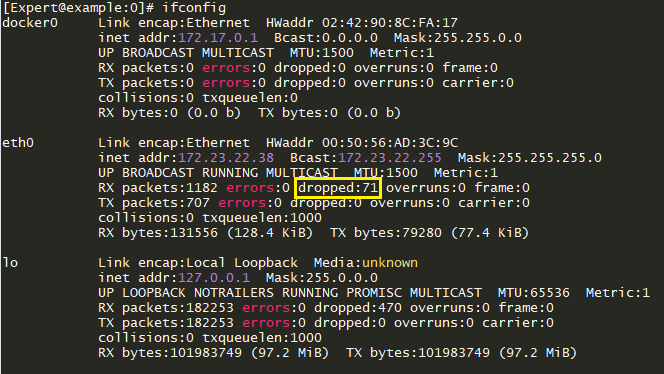
  • Output of the "ifconfig" command on a Security Gateway R80.30 and higher with Gaia kernel 3.10 shows that the number "RX packets - dropped" on interfaces increases.

    Example:

  • Output of the "netstat -ni" command on a Security Gateway R80.30 and higher with Gaia kernel 3.10 shows that the number "RX-DRP packets" on interfaces increases.

    Example:

  • There were no RX packet drops while in the same environment, the same Security Gateway was running R80.20 or lower versions with Gaia kernel 2.6.18.

Cause

Based on the expected Linux OS behavior, various commands in Gaia OS versions from R80.30 to R81 with kernel 3.10 may show RX packet drops on interfaces under these conditions:

  • The softnet backlog is full
  • Ethernet frames are received with bad VLAN tags
  • Packets are received with unknown or unregistered protocols
  • IPv6 packets are received while IPv6 is disabled in Gaia


To view the capability and the current values of your interface, you’ll need “ethtool”. Simply do the following command :

 ethtool -g eth0

This will output something like this :

Ring parameters for eth0:
Pre-set maximums:
RX: 4096
RX Mini: 0
RX Jumbo: 0
TX: 4096
Current hardware settings:
RX: 256
RX Mini: 0
RX Jumbo: 0
TX: 256 

We can see here that both RX and TX values are set to 256 but the interface have the capability of 4096 bytes.

To increase the buffers, do the following :

 ethtool -G eth0 rx 4096 tx 4096

Saturday, June 17, 2023

Routes_


How to Print Static-Routes netstat -nr | grep -v D

netstat -rn |grep eth1 | awk -F' ' ' {print $1, $2, $3}' | sort >routes.txt

netstat -rn |grep eth1 | awk -F' ' ' {print $1, $2, $3}' | sort | wc -l


cpstat -f licensing os 

ip -s route show cache

cpstat -f policy fw

cpstat -f IKE vpn

ip neighbor

netstat -rvm

fw ctl multk stat

arp -an


Blade Precedents - 

SSL Inspection

URL Filtering

Application Control 

IPS  Geo Protect 

Content Awareness 

Anti Bot

Anti Virus


SSL Light - DNS name 

SNI 

Certificate 


cpconfig

10

1


Acceleration 

fwaccel stats -s 


Affinity 

fw ctl affinity -l -r -v -a 

sim affinity -s 


Kernel

multi-kernel statistics (multik)

fw ctl multik stat

fw ctl multik get_mode

fw ctl multik dynamic_dispatching get_mode


CoreXL

Monitoring CoreXL load distribution

fw ctl affinity -l -a -v

fw ctl affinity -l -r


cat /opt/CPsuite-R80.20/fw1/boot/modules/fwkern.conf 


R80.20 secureXL and firewall act separelty


To check if the SND is slowing down the traffic:


Identify the processing core to which the interfaces are directing traffic using fw ctl affinity -l -r.

Under heavy traffic conditions, run the top command on the CoreXL gateway and check the values for the different cores under the 'idle' column.


Troubleshooting problem

investigation 

RCA - Root cause Analysis 


NETWORK /Subnet Mask

/16 /24 .0 -- 1 Subnets -- 244 hosts
/17 /25 .128 -- 2 Subnets -- 126 Hosts/Subnet
/18 /26 .192 -- 4 Subnets -- 62 Hosts/Subnet
/19 /27 .224 -- 8 Subnets -- 30 Hosts/Subnet
/20 /28 .240 -- 16 Subnets -- 14 Hosts/Subnet
/21 /29 .248 -- 32 Subnets -- 6 Hosts/Subnet
/22 /30 .252 -- 64 Subnets -- 2 Hosts/Subnet
/23 /31 .254

/32 .255 /32 -- 1 hosts

192.168.1.0/28 -- 16 Subnets -- 14 Hosts/Subnet
.0 - network
.1 - Usable host
.14 - Usable host
.15 - Broadcast
/29 has 6 usable IP

192.168.1.0/29 -- 32 Subnets -- 6 Hosts/Subnet
.0 - network
.1 - Usable host
.6 - Usable host
.7 - Broadcast

/30 has 2 usable IP
eg 192.168.1.0/30 (255.255.255.252) /30 -- 64 Subnets -- 2 Hosts/Subnet

.0 - network
.1 - Usable host
.2 - Usable host
.3 - Broadcast
eg 192.168.1.4/30
.4 - network
.5 - Usable host
.6 - Usable host
.7 - Broadcast

Checks

[Expert@myfw01:0]# 

1 pep show user all
2 pep show user all | wc -l
3 pdp show
4 pdp show connections
5 pdp connections
6 pdp connections pep
7 pep show
8 pep show user
9 pep show user query
10 pep show user query usr  myid01

[Expert@myfwe-int01:0]# installed_jumbo_take

R77.30 Jumbo Hotfix Accumulator take_117 is installed, see sk106162.

[Expert@myfwe-int01:0]#

[Expert@myfwe-int01:0]# cpinfo -y all 

VPN Site to Site Troubleshooting

 VPN Site to Site Troubleshooting 

VPN Users   fw tab -t userc_key -s

  1. Check if connectivity exist between the 2 Gateway peers
  2. VPN Debugging - Looking at the IKE negotiations
  3. Can both sides see the IKE packets arriving during teh Key Exchange? 

IKE Process (2 Phases)
Phase 1 - Main Mode (6 Packets)
Phase 2 - Quick Mode (3 Packets)

4. Turn VPN Debug On  - enter the command "vpn debug on; vpn debug ikeon" or "vpn debug trunc". 
The $FWDIR/log/ike.elg file contains information once debugging is enabled.
Checkpoint has a tool IKEView.exe - it parse information of ike.elg

5. Another tool is "vpn debug on mom" - it writes IKE captured data into file ikemonitor.snoop
This file is open with wireshark or ethereal. 

Phase I 

  • - Negotiates encryption methods (DES/3DES/AES etc)
  • - The key length
  • - The Hash Algorithm (MD5/SHA1) 
  • - Creates a key to protect the messages of the exchange. 


It does this in 5 stages:

  1. Peers Authenticate using Certificates or a pre-shared secret.
  2. Each peer generates a private Diffie-Hellman key from random bits and from that derives a DH public key. These are then exchanged.
  3. Each peer generates a shared secret from its private key and its peers public key, this is the DH key.
  4. The peers exchange DH Key material (random bits and mathematical data) and methods for PhaseII are agreed for encryption and integrity.
  5. Each side generates a symmetric key (based upon the DH key and key material exchanged).

In IkeView under the IP address of the peer, open the Main Mode Packet 1 - expand :
> "P1 Main Mode ==>" for outgoing or "P1 Main Mode <==" for incoming 
> MM Packet 1
> Security Association 
> prop1 PROTO_ISAKMP
> tran1 KEY_IKE

You should then be able see the proposed Encryption Algorithm, Key Length, Hash Algorithm, Authentication Method, DH Group, and SA renegotiation params (life type - usually secs and duration).

UNDERSTAND THE 5 PACKETS

- If your encryption fails in Main Mode 

Packet 1, then you need to check your VPN communities.

Packet 2 ( MM Packet 2 in the trace ) is from the responder to agree on one encryption and hash algorithm

Packets 3 and 4 arent usually used when troublshooting. They perform key exchanges and include a large number called a NONCE. The NONCE is a set   of never before used random numbers sent to the other part, signed and returned to prove the parties identity.

Packets 5 and 6 perform the authentication between the peers. The peers IP address shows in the ID field under MM packet 5. Packet 6 shows that   the peer has agreed to the proposal and has authorised the host initiating the key exchange.


NOTE: 

1. If your encryption fails in Main Mode Packet 1, then you need to check your VPN communities.

2. If your encryption fails in Main Mode Packet 5, then you need to check the authentication - Certificates or pre-shared secrets


PHASE II

Next is Phase II - the IPSec Security Associations (SAs) are negotiated, 

- The shared secret key material used for the SA is determined and there is an additional DH exchange. 

- Phase II failures are generatlly due to a misconfigured VPN domain. 

- Phase II occurs in 3 stages:

1. Peers exchange key material and agree encryption and integrity methods for IPSec.

2. The DH key is combined with the key material to produce the symmetrical IPSec key.

3. Symmetric IPSec keys are generated.


Note: For SecurePlatform or Gaia OS, you must be logged in as Expert.

1. Initiate debug of VPND daemon on Check Point Security Gateway from the CLI:
2. [Expert@HostName]# vpn debug trunc

Notes:

This command initiates both VPND debug and IKE debug, whereas the 'vpn debug on' command only initiates VPND debug.

If you also need the level of detail provided by TDERROR_ALL_ALL=5, then you also need to run:

[Expert@HostName]# vpn debug on TDERROR_ALL_ALL=5 

This must be run after the command 'vpn debug trunc'.

3. Disable SecureXL:
[Expert@HostName]# fwaccel off
[Expert@HostName]# fwaccel stat 

4. Initiate a packet capture on the Security Gateways involved in Site-to-Site VPN (or tcpdump, or Wireshark pcap):

Notes:

You can press "Alt + F1" to open a second terminal, or open a second SSH session, or (for Windows) open a second command prompt.

[Expert@HostName]# fw monitor -e "accept;" -o /var/log/fw_monitor.cap

or

[Expert@HostName]# fw monitor -e "accept port(500) or port(4500);" -o /var/log/fw_monitor.cap

or

[Expert@HostName]# vpn debug mon

If you run 'vpn debug mon', the output file is 'ikemonitor.snoop'. In this output file, all the IKE payloads are in clear text. Whereas, in 'fw_monitor.cap' file, all the IKE payloads are encrypted.

5. Launch the TunnelUtil tool, which is used to control VPN tunnels:
[Expert@HostName]# vpn tu
Note: Before running the 'vpn tu' command, kill all traffic over the VPN. This will include stopping all continuous traffic across the VPN tunnel.

6. Then select the option "Delete all IPsec+IKE SAs for a given peer (GW)".

7. Enter your remote Security Gateway IP address.

8. Exit from the 'vpn tu' utility.

Important note: This procedure closes open VPN tunnels. This can be useful because the next time communication is attempted you will capture the VPN tunnel creation information. Please be aware that existing VPN tunnels with this remote peer will be closed and will have to be reestablished. This is especially important in a Production environment. If the remote peer is a third-party device, then it is important to also clear the keys on the remote peer device. Clearing the keys on only the Check Point gateway will often cause a problem where the remote peer refuses to allow the Check Point to establish a new key because it already has one.

If it is not possible to clear the keys on both the Check Point gateway and the remote third-party peer, DO NOT clear the key on only the Check Point gateway! In that case, skip this step completely.

9. Reproduce the issue, attempt to connect FROM YOUR NETWORK to a device in the remote encryption domain. This initiates the tunnel.

10. Launch the TunnelUtil tool, which is used to control VPN tunnels:
[Expert@HostName]# vpn tu
Note: Before running the 'vpn tu' command, kill all traffic over the VPN.

11. Select the option that "Delete all IPsec+IKE SAs for a given peer (GW)".

12. Enter your remote Security Gateway IP address.

13. Exit from the 'vpn tu' the utility.

14. Reproduce the issue, attempt to connect FROM THE REMOTE NETWORK to a device in the local encryption domain. This initiates the tunnel.

15. Stop debug of VPND daemon on the Security Gateways involved in Site-to-Site VPN:
[Expert@HostName]# vpn debug truncoff
Note: If you used 'vpn debug mon' command, you need to run 'vpn debug moff'.

16. Stop packet capture by pressing "CTRL+C".

17. If SecureXL was disabled, re-enable it:
[Expert@HostName]# fwaccel on
[Expert@HostName]# fwaccel stat 

18. Send the following files from the Security Gateways to Check Point Support:
• $FWDIR/log/ike.elg*
• $FWDIR/log/vpnd.elg*
• $FWDIR/log/ikemonitor.snoop
• /var/log/fw_monitor.cap


From <http://dkcheckpoint.blogspot.com/2016/01/vpnsitetosite-troubleshooting.html> 


Friday, June 16, 2023

Unix

Unix Boot Process

1. BIOS - Basic Input/Output System execute MBR 
2. MBR - Master Boot Record executes GRUB
3. GRUB - Grand Unified Bootloader Execute Kernel 
4. KERNEL - Kernel execuites /sbin/init
5. INIT - Executes runlevel programs
6. RUNLEVEL - Runlevel programes are executed from /etc/rc.d/rc*.d/


du -sk /var/* 2> /dev/null | sort -rn
du -sk *|sort -n      Search for large files in directory


Files larger than 100000 

/var/log/tmp/list_of_files.txt

find / -type f -size +100000 -exec ls -lh {} \; 2> /dev/null | awk '{ print $NF ": " $5 }' | sort -nk 2,2 &> /var/log/tmp/list_of_files.txt


Find large files in Unix

1. du -sk *|sort -n
2. du -a /var | sort -n -r | head -n 10
3. find -type f -exec du -Sh {} + | sort -rh | head -n 5

[root@tes01vr usr1]#  find -type f -exec du -Sh {} + | sort -rh | head -n 5

 28G      
14G      
12G      
3.6G     
3.6G    

Use zgrep to search word in .gz file
root@Boston# zgrep myfile *.gz |grep  down | more
$ zcat file.gz | grep word-to-search
zgrep myfile *.gz |grep  up | more


Create a TAR  file
tar -zcvf axway.bkp.tar.gz axway


Untar file 
tar -zxvf share.tar.gz 


Where does win10 stores profile pictures

C:\Users\username\AppData\Roaming\Microsoft\Windows\AccountPictures
C:\Users\myname\AppData\Roaming\Microsoft\Windows\AccountPictures

The Default Account Pictures are stored here:
C:\ProgramData\Microsoft\User Account Pictures

C:\Users\mydesk >shutdown -r -f -t 00 -m 10.200.159.250


Monday, May 15, 2023

Checkpoint Firewall Customization - SIC cpd disable https2

 
For SIC to be established with management Server, endure CPD process on the Security Gateway is has started with E and not terminated T 

[Expert@my-FW:0]# cpwd_admin list
APP        PID    STAT  #START  START_TIME             MON  COMMAND             
FWK_FORKER 103721 E     1       [16:48:07] 27/4/2023   N    fwk_forker          
FWK_WD     103730 E     1       [16:48:07] 27/4/2023   N    fwk_wd -i 43 -i6 0  
CPD        104483 E     1       [16:48:23] 27/4/2023   Y    cpd                 
DASERVICE  126938 E     1       [16:55:53] 27/4/2023   N    DAService_script    
AUTOUPDATER 121008 E     1       [16:49:18] 27/4/2023   N    AutoUpdaterService.sh
CPVIEWD    104461 E     1       [16:48:23] 27/4/2023   N    cpviewd             
LPD        75565  E     1       [16:46:35] 27/4/2023   N    lpd                 
CPVIEWS    104466 E     1       [16:48:23] 27/4/2023   N    cpview_services     
SXL_STATD  104469 E     1       [16:48:23] 27/4/2023   N    sxl_statd           
MPDAEMON   104496 E     1       [16:48:23] 27/4/2023   N    mpdaemon /opt/CPshrd-R81.10/log/mpdaemon.elg /opt/CPshrd-R81.10/conf/mpdaemon.conf
TP_CONF_SERVICE 104523 E     1       [16:48:23] 27/4/2023   N    tp_conf_service --conf=tp_conf.json --log=error
CXLD       104743 E     1       [16:48:24] 27/4/2023   N    cxld -d             
CI_CLEANUP 104750 E     1       [16:48:24] 27/4/2023   N    avi_del_tmp_files   
CIHS       104757 E     1       [16:48:24] 27/4/2023   N    ci_http_server -j -f /opt/CPsuite-R81.10/fw1/conf/cihs.conf
FWD        104780 E     1       [16:48:24] 27/4/2023   N    fwd                 
SPIKE_DETECTIVE 104787 E     1       [16:48:24] 27/4/2023   N    spike_detective     
DSDEAMON   117031 E     1       [16:49:13] 27/4/2023   Y    dsd                 
[Expert@my-FW:0]# 


To disable https2 or enable https2 

1. Disable HTTP2 Header Length on my-vpn-fwa.mycompany.COM and my-vpn-fwb.mycompany.COM

To disable http2:
ckp_regedit -a SOFTWARE\\CheckPoint\\FW1 IGNORE_ALPN_EXTENSION 1
cpstop;cpstart

To enable http2 again:
ckp_regedit -a SOFTWARE\\CheckPoint\\FW1 IGNORE_ALPN_EXTENSION 0
cpstop;cpstart


VPN TRAC_Client_1 Files

/var/opt/CPsuite-R81.10/fw/conf/trac_client_1.ttm


RSA integration with Checkpoint 
Files are located in /var/ace directory
Must do a cpstop before change files and cpstart after
Initially you need just 2 files sdconf.rec and sdopts.rec file

sdconf.rec, 
sdopts.rec (clientIP) , 
securID (node secret), 
sdstatus.12 (traffic info between FW and Auth Manager)


Migrate Export of Checkpoint Management Server 

[Expert@CP-MGMT01]# cd $FWDIR/bin/upgrade_tools
[Expert@CP-MGMT01]# pwd
/opt/CPsuite-R80.40/fw1/bin/upgrade_tools
[Expert@CP-MGMT01]# cd $HOME
[Expert@CPMGMT01]# yes | nohup ./migrate export /home/admin/CPMGMT01-090622.tgz
nohup: appending output to 'nohup.out'
[Expert@CP-MGMT01]#

  • cpinfo -y all
  • enabled_blades
  • fw stat
  • cpinfo from gateway and cpinfo / migrate export from management server


Friday, April 21, 2023

Transfer Configuration from one appliance to another

 Checkpoint How To Documentation

Source CP appliance (Existing)
HostName > save configuration <filename>

SCP File to New Hardware

Destination CP Appliance (New)
HostName > set clienv on-failure continue
HostName > load configuration <filename>
HostName > set clienv on-failure stop
HostName > save config


Checkpoint Snapshots and hotfixes


Collect:

  • Snapshot - after a fresh installation, before an upgrade, and before a hotfix installation.
  • Scheduled Backup - monthly or weekly, depending how frequently you perform changes in your configuration and policy

Snapshot Management

The snapshot creates a binary image of the entire root (lv_current) disk partition. This includes Check Point products, configuration, and operating system.

The log partition is not included in the snapshot. Therefore, any locally stored Firewall logs will not be saved.

Backup Management

System Backup can be used to backup current system configuration. A backup creates a compressed file that contains the Check Point configuration including the networking and operating system parameters, such as routing and interface configuration etc., but unlike a snapshot, it does not include the operating system, product binaries, and hotfixes.


I've also highlighted in Green where each command is preferable.


Snapshot Management
snapshot

System Backup
backup
How much time does it take ?
30 - 60 minutes
5 - 30 minutes
Size of output file on Security Gateway
5-100 GB
Depends on configuration
Size of output file on Management Server
5-100 GB
5-100 GB
Does it back up Gaia OS configuration ?
Yes
Yes
Does it back up Products configuration ?
Yes
Yes
Does it back up Hotfixes ?
Yes
No (*)
Does it back up Check Point logs?
No
No
Does it support automatic scheduling ?
No
Yes
Can you restore from different version ?
Yes
No
Does it require to close SmartConsole GUI clients ?
No
R7x - No
R80 - Yes
Does it require to stop Check Point services?
No
No
Does it require reboot ?
No
No